A shop vac that overheats and shuts off is usually protecting itself from restricted airflow, a clog, an incorrect filter setup, or an overfilled drum. Unplug it, let it cool, then work through these checks before using it again.
A shop vac that overheats and shuts off is usually dealing with restricted airflow, a clog, an incorrectly installed filter, a leak, or an overloaded collection container. Unplug the vacuum and let it cool completely before checking it. Do not bypass a thermal cutoff or continue running the machine if it smells burnt, shows damaged wiring, or trips the circuit breaker.
Start with safety
Turn the shop vac off and unplug it.
Let the motor cool fully. This may take longer than a few minutes if the housing is very hot.
Move it away from flammable materials while it cools.
Do not open the motor housing unless the manufacturer permits it and you are qualified to do so.
Many shop vacs have thermal protection that shuts the motor off when it gets too hot. The shutdown can be temporary, but repeated overheating is a warning that the underlying problem still needs attention.
Check the filter first
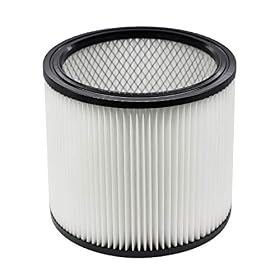
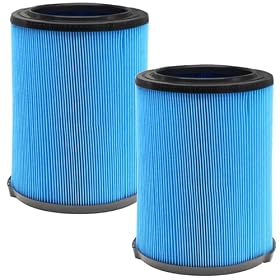
A clogged filter is one of the most common causes of overheating. As the filter loads with dust, the motor has to work against restricted airflow. Fine dust can block a filter quickly, even when it does not look heavily coated from the outside.
Remove the filter only after the vacuum is unplugged, then check:
Whether the filter is packed with dust or debris
Whether the filter is wet when it is intended for dry pickup
Whether it is torn, collapsed, or otherwise damaged
Whether it is the correct filter for the vacuum and the material being collected
Whether a disposable filter bag is full or incorrectly fitted
Clean or replace the filter according to the manufacturer’s instructions. Do not wash a filter unless it is specifically labeled washable. A wet filter can restrict airflow and may damage a filter that was designed only for dry use.
For wet pickup, use the filter arrangement specified by the manufacturer. Some vacuums require a foam sleeve or a particular wet-pickup filter, while a standard dry filter may be unsuitable.
Product prices and availability are accurate as of the date/time indicated and are subject to change. Any price and availability information displayed on Amazon.com at the time of purchase will apply to the purchase of this product.
Inspect the hose, wand, and nozzle for a clog
A blockage anywhere in the air path can make the vacuum run hot. Check the hose first, then the wand, floor nozzle, crevice tool, and any adapter.
Disconnect the hose and look through it from both ends. A flexible hose may appear open while a plug is lodged in a bend. If the manufacturer permits it, carefully clear the obstruction with a suitable blunt tool. Avoid forcing sharp objects through the hose, since a puncture can create a leak.
Also check the inlet inside the collection drum. Large debris can lodge at the inlet even when the hose itself is clear. Remove debris only with the vacuum unplugged and your hands protected from sharp material.
Product prices and availability are accurate as of the date/time indicated and are subject to change. Any price and availability information displayed on Amazon.com at the time of purchase will apply to the purchase of this product.
Look for air leaks and damaged seals
A split hose, loose connection, missing gasket, or poorly seated lid can reduce airflow and make the motor work harder. Check the following points:
Hose-to-vacuum connection
Hose-to-tool connection
Lid gasket and latches
Filter cage and filter seal
Drain cap or drain plug
Collection bag connection, if equipped
Cracks in the drum or lid
Reconnect every fitting firmly and replace damaged seals or hoses. A small leak may not stop the vacuum immediately, but it can reduce pickup performance and contribute to overheating when the machine is operated for a long period.
Product prices and availability are accurate as of the date/time indicated and are subject to change. Any price and availability information displayed on Amazon.com at the time of purchase will apply to the purchase of this product.
Confirm the setup is correct
Incorrect setup can restrict airflow or send material into parts of the vacuum that are not designed to handle it. Check the manual for the required configuration for dry pickup, wet pickup, fine dust, and dusty power-tool use.
Common setup problems include:
Using a dry filter during wet pickup when the instructions prohibit it
Leaving a filter installed when the manual calls for a different wet-pickup setup
Using a filter that does not seal against the filter cage
Attaching an accessory with an opening that is too small for the material being collected
Connecting the hose to the wrong port or using an incompatible adapter
Operating the vacuum with the lid or latches not fully secured
Fine dust from drywall, concrete, ash, or similar materials may require a filtration setup designed for that material. Ordinary shop-vac filters can load rapidly when used with very fine dust, and some materials require specialized collection methods.
Empty the drum or replace the bag
A full drum or collection bag can restrict airflow and leave less room for incoming material. Empty the drum before the debris reaches the inlet or the maximum fill level marked by the manufacturer.
For wet pickup, stop and empty the tank when it reaches the indicated limit or when the automatic shutoff activates. Do not continue running the vacuum after the float or shutoff has closed the airflow path.
For dry pickup, replace a full disposable bag rather than shaking it out if the bag is intended for one-time use. Make sure the new bag is seated correctly and is not blocking the inlet.
Check the float and wet-pickup mechanism
If the vacuum overheats after collecting liquid, the float may be stuck, dirty, or incorrectly installed. With the vacuum unplugged, inspect the float area for debris and confirm that moving parts are not obstructed.
Do not run the vacuum with liquid if the manufacturer’s instructions do not allow that configuration. After wet pickup, empty the tank and allow the appropriate components to dry as directed. Moisture left in the vacuum can contribute to odors, filter problems, and corrosion.
Consider run time and operating conditions
A shop vac can become hot during long, continuous operation, especially with a restricted hose, loaded filter, or heavy debris. Let the machine cool between extended jobs when the instructions recommend doing so.
Keep the motor vents clear. Do not cover the vacuum or operate it in a position that blocks cooling air. Very hot surrounding temperatures can also shorten the time it takes for thermal protection to activate.
If the vacuum works normally after cooling but shuts off again during ordinary use, treat that as a fault to diagnose—not as a reason to keep restarting it.
Check the power source only after airflow checks
If the filter, hose, seals, setup, and drum are all correct, inspect the power supply. A long or undersized extension cord can cause voltage drop and additional motor heating. Use the cord type and length allowed by the manufacturer, and plug the vacuum into a suitable grounded outlet.
Stop using the vacuum and arrange professional electrical service if:
The cord, plug, or outlet is hot, melted, cracked, or discolored
The vacuum repeatedly trips a breaker or ground-fault device
You smell burning insulation or see smoke
The motor makes grinding, screeching, or unusual electrical noises
The vacuum shuts off immediately even with clear airflow and an empty drum
It will not restart after cooling
Do not replace a fuse with a higher-rated fuse, defeat a ground-fault device, or bypass the thermal protector. Follow the manufacturer’s instructions and use a qualified professional for internal motor or wiring repairs.
When to replace a part or the vacuum
A replacement filter, bag, hose, gasket, or float assembly is reasonable when that part is visibly damaged, no longer seals, or cannot be cleaned according to the instructions. Use a part specifically listed as compatible with the vacuum; similar-looking filters and hoses may not seal or provide the required airflow.
Replacing the vacuum may make more sense when the motor repeatedly overheats after the airflow path is clear, the motor has burning damage, repair parts are unavailable, or the repair cost approaches that of a suitable replacement unit. Until the cause is resolved, avoid using the vacuum for unattended or extended jobs.
Quick diagnostic order
For a shop vac that overheats and shuts off, check these items in order:
Unplug it and let it cool.
Clean or replace the filter and check the bag.
Clear the hose, inlet, wand, and nozzle.
Check hoses, lid seals, filter seals, and drain plugs for leaks.
Confirm the wet/dry and fine-dust setup matches the instructions.
Empty the drum and inspect the float or automatic shutoff.
Keep vents clear and reduce excessive continuous run time.
Check the cord and outlet for damage or unsuitable power.
Seek service if the motor still overheats, smells burnt, trips protection, or will not restart.
FAQ
Why does my shop vac shut off after a few minutes?
Thermal protection may be activating because of a clogged filter, blocked hose, full drum or bag, leaking seal, incorrect wet/dry setup, blocked cooling vents, or an electrical problem. Unplug the vacuum, let it cool, and check airflow components before restarting it.
Can a dirty filter make a shop vac overheat?
Yes. A loaded filter restricts airflow and can make the motor work harder and run hotter. Clean or replace the filter according to the manufacturer’s instructions, and use the correct filter for the material being collected.
How long should I wait before restarting an overheated shop vac?
Wait until the motor and housing have cooled completely rather than relying on a fixed time. If it overheats again during normal use, stop operating it and find the cause instead of repeatedly resetting or restarting it.
Should I replace my shop vac if it keeps overheating?
First check the filter, hose, seals, setup, drum or bag, float, vents, and power supply. If those are correct and the vacuum still overheats, smells burnt, makes unusual noises, or trips electrical protection, professional repair or replacement is the safer next step.