A shop vac switch that fails repeatedly may be damaged by dust or moisture, but the motor, wiring, or an overloaded vacuum can be the underlying cause. Unplug it before checking anything, and don’t keep replacing the switch without finding why it failed.
If your shop vac switch keeps failing, stop using the vacuum until you know why. Dust or moisture can damage a switch, but a clogged vacuum, failing motor, or wiring problem may be stressing it. Unplug the vac before inspecting it, and never bypass the switch or keep replacing it without checking for an underlying fault.
Identify what “failing” means
Notice what happens when the problem occurs. A switch that feels loose or no longer clicks may be mechanically worn. One that works intermittently could have a damaged switch or loose connection. A switch that becomes hot, smells burnt, melts, or fails soon after replacement may indicate a more serious electrical or motor problem.
If you see melting or smoke, smell burning, or hear unusual electrical buzzing, unplug the vacuum if it is safe to do so and leave it out of service. Don’t open the switch housing while it is plugged in.
Check for an overloaded vacuum first
A restricted airflow path can make the motor work harder. With the vacuum unplugged, check these items in order:
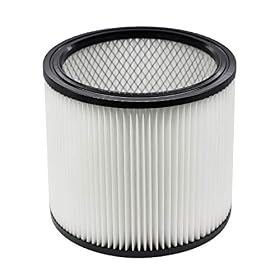
Filter: Check whether it is clogged, wet, damaged, or the wrong type for the job. Clean or replace it as the manufacturer directs. Don’t run the vac without a filter unless its manual specifically allows it.
Hose and attachments: Look for a blockage in the hose, wand, or nozzle. Remove debris only while the vacuum is unplugged.
Seals and connections: Make sure the hose and lid are seated properly and that seals are not damaged or displaced.
Setup: Confirm the vacuum is configured for the material being collected. Follow the manual for wet pickup, filter use, and any float or shutoff components.
Drum or bag: Empty a full drum or replace a full collection bag as directed. A full container can restrict airflow.
After clearing a restriction, use the vacuum only if the switch and cord show no damage and the motor runs normally. If the switch fails again, stop rather than repeatedly trying to restart it.
Product prices and availability are accurate as of the date/time indicated and are subject to change. Any price and availability information displayed on Amazon.com at the time of purchase will apply to the purchase of this product.
Consider dust, moisture, or a damaged cord
Fine dust can work into an unsealed switch, and moisture can damage electrical parts if it reaches areas not designed for wet pickup. Keep the switch area dry and follow the manual’s instructions for wet use and cleanup. Don’t spray cleaner or compressed air into the switch.
With the vac unplugged, look over the cord, plug, and exterior for cuts, crushed areas, discoloration, or a loose plug. Don’t use the vacuum if you find damage. Avoid taping over a damaged cord or continuing to operate it because the switch still works occasionally.
Product prices and availability are accurate as of the date/time indicated and are subject to change. Any price and availability information displayed on Amazon.com at the time of purchase will apply to the purchase of this product.
When to replace the switch—or stop using the vac
A replacement switch may be reasonable when the switch is visibly damaged or mechanically worn, the rest of the vacuum appears sound, and the manufacturer provides a compatible replacement. Match the part to the exact make and model; switches that look alike may have different electrical ratings or connections.
Replacing a switch involves electrical connections inside the vacuum. If you’re not qualified to do that work, have an appliance repair professional or the manufacturer’s service provider handle it. Never install a switch with a lower rating, improvise wiring, or bypass the switch.
If a correctly matched replacement switch fails again, or the motor runs roughly, smells hot, sparks, or repeatedly stops, the problem may be in the motor or internal wiring. Leave the vacuum unplugged and have it professionally inspected. Repair makes sense only if the fault can be safely diagnosed and the parts are available; otherwise, replacing the vacuum may be the more practical option.
FAQ
Can a clogged filter make a shop vac switch fail?
A clogged filter can restrict airflow and make the motor work harder, but it does not prove the filter caused switch damage. Clear the restriction and replace a damaged or unsuitable filter as directed. If the switch fails again, stop using the vac and have the electrical or motor fault checked.
Is it safe to replace a shop vac switch myself?
Only if you are qualified to work on electrical appliances and can follow the manufacturer’s service instructions. Unplug the vacuum first and use only a switch confirmed to match the exact model. Otherwise, use a qualified repair professional.
Why does a replacement switch fail soon after installation?
Possible causes include an incorrect or underrated replacement part, a wiring problem, moisture or contamination, or a motor fault. Don’t install another switch or bypass the circuit; unplug the vacuum and arrange a proper inspection.